AI automation agency and implementation partner in India

AI agents and agentic workflows designed around real business work

Nanovise helps organisations move from an interesting AI idea to a bounded, testable workflow. We map the task, connect the right knowledge and tools, define human control and coordinate implementation for voice, WhatsApp, website chat and multi-step automation.

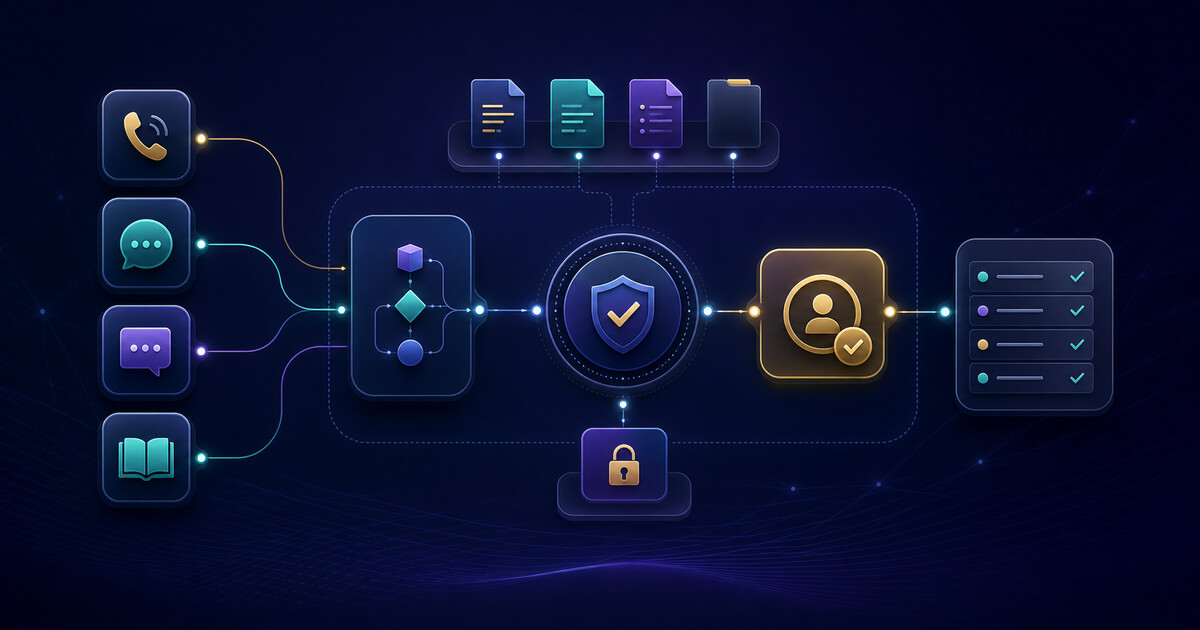
Illustration of governed AI agents connecting voice, messaging, website chat and knowledge sources to human approval
Illustrative Nanovise overview: approved channels and knowledge feed a bounded workflow, with permissions, human approval and an observable outcome.
AI solution areas

A channel-specific agent or a connected workflow

The project should reflect where work already happens. Some teams need a better customer interface; others need an assistant that can retrieve internal knowledge or coordinate a controlled sequence across systems.

Voice

AI voice agents for defined call journeys

Design inbound or outbound workflows for routine enquiries, lead intake, appointment requests, status checks or structured follow-up. Telephony, language coverage, consent, escalation and call recording requirements are validated for the actual use case.

Explore AI voice agent solutions
WhatsApp

WhatsApp AI agents for customer workflows

Combine a suitable WhatsApp business messaging route with grounded answers, structured data capture, approved system actions and human takeover. Platform rules, consent, templates and integration access form part of the scope.

Explore WhatsApp AI automation
Knowledge

SmartChat and RAG knowledge assistants

Retrieve relevant context from approved website pages, help content or internal documents before answering. A grounded assistant can expose sources, acknowledge uncertainty and route unsupported questions to a team.

Explore website AI chatbots
Explore RAG knowledge assistants
Custom agents

AI agent development around a defined task

Design a bounded agent around the actual users, approved knowledge, available integrations, evaluation cases and escalation path instead of forcing a generic bot into the workflow.

Explore AI agent development
Automation

AI workflow automation with human checkpoints

Connect classification, retrieval, drafting, approvals and permitted system actions into an observable workflow that keeps exceptions and sensitive decisions with the responsible team.

Explore AI workflow automation
Agentic

Agentic AI solutions for governed multi-step work

Coordinate several permitted steps when an answer alone is insufficient—for example, classify a request, retrieve account context, draft an action, request approval, update a system and log the outcome. Autonomy is constrained by risk and reversibility.

Explore agentic AI solutions
Illustrative workflow screens

See how AI work can remain visible and reviewable

A useful agent needs more than a conversation box. Teams need to see what the agent understood, which knowledge it used, what action it proposes and when a person must take over.

Voice enquiry Ready for review
Caller intent Pricing and installation enquiry
AI summary Location, requirement and preferred callback window captured
Next step Human approval before a CRM or follow-up action

Voice-agent review screen

Expose the call purpose, summary, extracted fields and handoff state to the responsible team.

Review voice-agent workflows
WhatsApp enquiry Human handoff available
Do you support WiFi planning for a 40-room hotel?
Yes. I can collect the property location, requirement and preferred callback window for the Nanovise team.
Routing outcome Qualified enquiry queued for a person—no unapproved quotation sent

WhatsApp intake with handoff

Ground answers in approved information, capture structured details and make the transfer state clear.

Review WhatsApp AI automation
Knowledge assistant Sources attached
Question When should a support request be escalated?
Grounded answer Escalate when confidence is low, policy requires approval or the customer asks for a person.
Support policy §4.2 Escalation FAQ

RAG answer with source visibility

Show the approved material behind an answer and retain a clear fallback for unsupported questions.

Review RAG knowledge assistants

These are illustrative interface patterns, not screenshots of one universal packaged product. Final screens, integrations and available actions depend on the agreed workflow and systems.

What “agentic” means in practice

A governed sequence of decisions and tool use

An agentic AI solution is not simply a chatbot with a new label. It works toward a defined outcome across multiple steps and may use tools under explicit permissions. The workflow needs observable state, failure handling and a reliable route to a person.

Reference architecture for a bounded agentic workflow

The agent has a narrow objective and only the context and tools approved for that objective.

  1. Trigger A user request or business event starts the workflow.
  2. Understand The agent classifies intent, constraints and missing information.
  3. Retrieve Approved knowledge or authorised records provide context.
  4. Act & verify A permitted tool is used and its result is checked.
  5. Approve or log A person approves higher-risk work; the outcome is recorded.
Illustrative architecture only. A production design may use fewer steps, more validation or no autonomous write action at all.
Potential workflows

Start with a visible operational bottleneck

These examples show the shape of a discovery conversation. They are not claims about a prebuilt integration or a guaranteed business result.

Lead qualification

Collect the need, location, budget range or timeline; answer approved questions; create a structured lead when an integration is available; route priority enquiries to sales.

Customer support triage

Identify the issue, retrieve relevant guidance, gather evidence, create or enrich a ticket and escalate when confidence, policy or customer sentiment requires it.

See an AI support pattern for PM-WANI

Hospitality assistance

Answer approved property questions, collect a guest request and route it to the responsible team. Any PMS, ticketing or booking action depends on validated system access.

Explore AI solutions for hotels

Internal knowledge work

Search controlled policy or product content, produce a source-linked answer, prepare a draft or checklist and keep the final decision with the responsible employee.

Explore RAG knowledge assistants
Implementation path

From workflow map to measured production rollout

01

Discover

Map the current process, users, data, systems, pain points, exception paths and desired outcome. Identify work that should remain human.

02

Design

Define the agent boundary, approved knowledge, tools, permissions, handoff path, evaluation set and operating responsibilities.

03

Pilot

Test representative scenarios and failure cases with limited users or traffic. Review answer quality, tool results, latency and escalation behaviour.

04

Operate

Roll out against agreed acceptance criteria, monitor exceptions, maintain knowledge and permissions, and improve from reviewed feedback.

Pilot acceptance evidence

Define what “working” means before production

A credible pilot needs representative scenarios, known failure cases and acceptance criteria agreed before broader rollout. The evidence should reflect the actual business task—not a generic model benchmark or an unverified promise of savings.

Nanovise can help define an evaluation set, review exceptions and separate model quality from integration, knowledge, latency and operating-process issues.

Evidence a pilot may collect

  • Answer quality against approved sources
  • Correct routing and human handoff
  • Tool-action accuracy and reversibility
  • Unsupported-question behaviour
  • Latency and operating cost observations
  • Permission, consent and activity-log review
Integrations

Connect only what the workflow needs

An agent can be assessed for integration with CRM, helpdesk, reservation, property, telephony, messaging, document or internal systems when suitable APIs and permissions exist. Read access, write access and approval requirements are treated separately.

We confirm feasibility against the actual vendor, account tier, API limits, data model and security policy. A named integration is never assumed from the software category alone.

Controls considered during design

  • Least-privilege tool permissions
  • Approved and maintainable sources
  • Consent and data minimisation
  • Prompt and workflow versioning
  • Evaluation and exception review
  • Human approval for sensitive actions
  • Fallback when a model or API fails
  • Activity logs appropriate to the use case
Questions to resolve before a pilot

AI automation and agentic solutions FAQ

What does an AI solutions agency do?

An AI solutions agency connects a business problem to a workable combination of models, approved knowledge, software tools, integrations, controls and human support. A useful engagement includes workflow discovery, evaluation criteria, implementation and an operating plan, not only a chatbot interface.

What is the difference between an AI chatbot and an AI agent?

A chatbot mainly exchanges messages. An AI agent may also retrieve approved information, call permitted tools, update a system or route work according to defined rules. The amount of autonomy should match the risk of the task, with approval and human handoff where needed.

What are agentic AI solutions?

Agentic AI solutions coordinate several steps toward an outcome, such as understanding a request, retrieving context, using an approved tool, checking the result and recording or escalating the work. They require clear permissions, failure handling, auditability and boundaries.

Can an AI agent connect to existing business software?

Often, yes, when the existing system exposes a suitable API or another approved integration route. Feasibility depends on access, data quality, security requirements and vendor limits, so integrations are confirmed during technical discovery.

How does Nanovise start an AI automation project?

Nanovise starts by mapping one workflow, the users involved, available data, desired outcome, exceptions and escalation points. The team then defines a bounded pilot, evaluation measures and the controls required before any production rollout.

Can AI automation keep a human in control?

Yes. Human approval, confidence thresholds, restricted actions, escalation queues, source visibility and activity logs can be designed into the workflow. The right controls depend on the sensitivity and reversibility of each action.

Bring one workflow—not a shopping list of AI tools

Nanovise will help map the users, systems, risks and acceptance criteria, then recommend whether the best next step is a simple automation, an assistant or a bounded agentic pilot.

Nanovise.com © 2026. All rights reserved.